http://sqlandme.com/category/sqlserver/sqlserver-2008-r2/
SQL Server – Different Ways to Check Object Definition
sp_helptext is widely used for checking object definition in SQL Server. sp_helptext can be used to check definition of various database objects like Views, Stored Procedures and User Defined Functions.
There are two other options which can be used to retrieve object definition:
OBJECT_DEFINITION( object_id ) – is a built-in function. It can also retrieve definitions of CHECK/DEFAULT constraints
sys.sql_modules – is a catalog view which returns definitions of all modules in current database
Each of these can be used as follows:
1
2
3
4
5
6
7
8
9
10
11
12
13
14
15
| USE [SqlAndMe]GOsp_helptext 'MyProcedure'GO-- Use OBJECT_ID() function to get object idSELECT OBJECT_DEFINITION(OBJECT_ID('MyProcedure'))GO-- Use OBJECT_ID() function to get object idSELECT [definition]FROM sys.sql_modulesWHERE object_id = OBJECT_ID('MyProcedure')GO |
OBJECT_DEFINITION(object_id) and sys.sql_modules returns results as a single-line when in “Results to Grid” (Ctrl + D) mode. Switch to “Results to Text” (Ctrl + T) for formatted output which will include line breaks.
Hope This Helps!
Vishal
If you like this post, do like my Facebook Page –> SqlAndMe
EMail me your questions -> Vishal@SqlAndMe.com
Follow me on Twitter -> @SqlAndMe
EMail me your questions -> Vishal@SqlAndMe.com
Follow me on Twitter -> @SqlAndMe
Categories:Catalog Views, SQLServer, SQLServer 2005, SQLServer 2008, SQLServer 2008 R2, SQLServer 2012
SQL Server – Hide system objects in Object Explorer – SQL Server Management Studio
By default, SQL Server system objects are listed in Object Explorer in Management Studio. These system objects include system database, system tables/views/procedures and so on.
SQL Server Management Studio provides an option to hide these objects from Object Explorer to prevent *accidental* use.
To enable this option follow below steps.
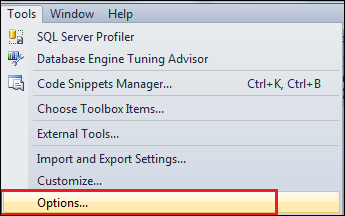
Step1: Go to Tools > Options
Step2: Navigate to Environment > Startup

Step3: Check Hide system objects in Object Explorer and click OK:

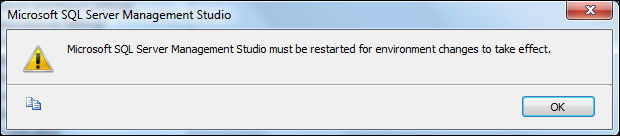
Step4: An confirmation message will be displayed saying that changes will take effect after Management Studio is restarted, click on OK to continue:
Once you restart SQL Server Management Studio, you will notice that system objects are no longer listed in Object Explorer:

As you can see from above screenshot that System databases node is no longer available in Object Explorer.
What is hidden by this setting:
1. System databases – This is not hidden for SQL Server 2012
2. System Stored Procedures
3. System Tables
4. System Views
2. System Stored Procedures
3. System Tables
4. System Views
Hope This Helps!
Vishal
If you like this post, do like my Facebook Page –> SqlAndMe
EMail me your questions -> Vishal@SqlAndMe.com
Follow me on Twitter -> @SqlAndMe
EMail me your questions -> Vishal@SqlAndMe.com
Follow me on Twitter -> @SqlAndMe
SQL Server – How to get last access/update time for a table
Modify date and create date for a table can be retrieved from sys.tables catalog view. When any structural changes are made the modify date is updated. It can be queried as follows:
1
2
3
4
5
6
7
8
9
| USE [SqlAndMe]GOSELECT [TableName] = name,create_date,modify_dateFROM sys.tablesWHERE name = 'TransactionHistoryArchive'GO |
sys.tables only shows modify date for structural changes. If we need to check when was the tables last updated or accessed, we can use dynamic management viewsys.dm_db_index_usage_stats. This DMV returns counts of different types of index operations and last time the operation was performed.
It can be used as follows:
1
2
3
4
5
6
7
8
9
| USE [SqlAndMe]GOSELECT [TableName] = OBJECT_NAME(object_id),last_user_update, last_user_seek, last_user_scan, last_user_lookupFROM sys.dm_db_index_usage_statsWHERE database_id = DB_ID('SqlAndMe')AND OBJECT_NAME(object_id) = 'TransactionHistoryArchive'GO |
last_user_update – provides time of last user update
last_user_* – provides time of last scan/seek/lookup
It is important to note that sys.dm_db_index_usage_stats counters are reset when SQL Server service is restarted.
Hope This Helps!
Vishal
If you like this post, do like my Facebook Page –> SqlAndMe
EMail me your questions -> Vishal@SqlAndMe.com
Follow me on Twitter -> @SqlAndMe
EMail me your questions -> Vishal@SqlAndMe.com
Follow me on Twitter -> @SqlAndMe
Categories:Catalog Views, SQLServer, SQLServer 2005, SQLServer 2008, SQLServer 2008 R2, SQLServer 2012
SQL Server – Displaying line numbers in Query Editor – SSMS
You can enable line numbers to be displayed in SSMS Query Editor. This is extremely useful when working on a large module.
To enable line numbers in Query Editor windows, follow below steps:
Step1: Go to Tools > Options

Step2: In the Options dialog box navigate to Text Editor > Transact-SQL > General

Step 3: Check “Line Numbers” and click on “OK”

Now, when a query window is opened Line Numbers will be displayed:

Hope This Helps!
Vishal
If you like this post, do like my Facebook Page –> SqlAndMe
EMail me your questions -> Vishal@SqlAndMe.com
Follow me on Twitter -> @SqlAndMe
EMail me your questions -> Vishal@SqlAndMe.com
Follow me on Twitter -> @SqlAndMe
SQL Server – Difference between @@CONNECTIONS and @@MAX_CONNECTIONS
@@MAX_CONNECTIONS in SQL Server returns maximum number of simultaneous user connections allowed. Maximum user connections allowed by SQL Server by default is 32,767; this number also depends on application and server hardware limits. This cam also be configured at server-level to avoid too many connections.
@@CONNECTIONS returns number of connection attempts (successful/failed) made to SQL Server since SQL Server is started. Since this include all attempts it can be greater than@@MAX_CONNECTIONS.
SELECT [ConnectionAttempts] = @@CONNECTIONS,
[MaximumAllowed] = @@MAX_CONNECTIONS
Result Set:
ConnectionAttempts MaximumAllowed
394024473 32767
(1 row(s) affected)
As you can see from the example above number of connection attempts can be higher.
Hope This Helps!
Vishal
If you like this post, do like my Facebook Page –> SqlAndMe
EMail me your questions -> Vishal@SqlAndMe.com
Follow me on Twitter -> @SqlAndMe
EMail me your questions -> Vishal@SqlAndMe.com
Follow me on Twitter -> @SqlAndMe
SQL Server – Different ways to check Recovery Model of a database
A Recovery Model is property of a database which control how transaction log is maintained. SQL Server supports SIMPLE, FULL and BULK-LOGGED recovery models.
There are multiple ways to check recovery model of a database in SQL Server.
1. Using SQL Server Management Studio:
Right click on Database in Object Explorer > go to Properties dialog box > Options page >Recovery model

SELECT [RecoveryModel] = DATABASEPROPERTYEX('SqlAndMe','Recovery')
GO
Result Set:
RecoveryModel
SIMPLE
SELECT [DatabaseName] = name,
[RecoveryModel] = recovery_model_desc
FROM sys.databases
GO
Result Set:
DatabaseName RecoveryModel
master SIMPLE
tempdb SIMPLE
model FULL
msdb SIMPLE
Pubs SIMPLE
SqlAndMe SIMPLE
AdventureWorks2012 SIMPLE
Northwind SIMPLE
TestDB SIMPLE
ProductCatalog SIMPLE
ReportDemo SIMPLE
ReportServer FULL
ReportServerTempDB SIMPLE
(13 row(s) affected)
Using sys.databases catalog view is easier as it returns information of all databases on server.
Hope This Helps!
Vishal
If you like this post, do like my Facebook Page –> SqlAndMe
EMail me your questions -> Vishal@SqlAndMe.com
Follow me on Twitter -> @SqlAndMe
EMail me your questions -> Vishal@SqlAndMe.com
Follow me on Twitter -> @SqlAndMe
SQL Server – Calculating elapsed time from DATETIME
Elapsed time can be calculated from DATETIME field by extracting number of hours/minutes and seconds. You can use below query to calculate elapsed time between two dates:
1
2
3
4
5
6
7
8
9
10
11
12
13
14
15
16
17
18
19
20
21
22
23
24
25
26
27
28
29
30
31
32
33
34
| -- Vishal - http://SqlAndMe.comDECLARE @startTime DATETIMEDECLARE @endTime DATETIMESET @startTime = '2013-11-05 12:20:35'SET @endTime = '2013-11-10 01:22:30'SELECT [DD:HH:MM:SS] = CAST((DATEDIFF(HOUR, @startTime, @endTime) / 24) AS VARCHAR) + ':' + CAST((DATEDIFF(HOUR, @startTime, @endTime) % 24) AS VARCHAR) + ':' + CASE WHEN DATEPART(SECOND, @endTime) >= DATEPART(SECOND, @startTime) THEN CAST((DATEDIFF(MINUTE, @startTime, @endTime) % 60) AS VARCHAR) ELSE CAST((DATEDIFF(MINUTE, DATEADD(MINUTE, -1, @endTime), @endTime) % 60) AS VARCHAR) END + ':' + CAST((DATEDIFF(SECOND, @startTime, @endTime) % 60) AS VARCHAR), [StringFormat] = CAST((DATEDIFF(HOUR , @startTime, @endTime) / 24) AS VARCHAR) + ' Days ' + CAST((DATEDIFF(HOUR , @startTime, @endTime) % 24) AS VARCHAR) + ' Hours ' + CASE WHEN DATEPART(SECOND, @endTime) >= DATEPART(SECOND, @startTime) THEN CAST((DATEDIFF(MINUTE, @startTime, @endTime) % 60) AS VARCHAR) ELSE CAST((DATEDIFF(MINUTE, DATEADD(MINUTE, -1, @endTime), @endTime) % 60) AS VARCHAR) END + ' Minutes ' + CAST((DATEDIFF(SECOND, @startTime, @endTime) % 60) AS VARCHAR) + ' Seconds ' |
Result Set:
DD:HH:MM:SS StringFormat4:13:2:55 4 Days 13 Hours 2 Minutes 55 Seconds
(1 row(s) affected)
[UPDATE] Earlier query had an error in calculation, thanks to Carlos for pointing it out and Nate for providing the correct solution.
Hope This Helps!
Vishal
If you like this post, do like my Facebook Page –> SqlAndMe
EMail me your questions -> Vishal@SqlAndMe.com
Follow me on Twitter -> @SqlAndMe
EMail me your questions -> Vishal@SqlAndMe.com
Follow me on Twitter -> @SqlAndMe
SQL Server – Kill all sessions using database
Before an existing database can be restored, there should be connections using the database in question. If the database is currently in use the RESTORE command fails with below error:
Msg 3101, Level 16, State 1, Line 2
Exclusive access could not be obtained because the database is in use.
Msg 3013, Level 16, State 1, Line 2
RESTORE DATABASE is terminating abnormally.
Exclusive access could not be obtained because the database is in use.
Msg 3013, Level 16, State 1, Line 2
RESTORE DATABASE is terminating abnormally.
To avoid this, we need to kill all sessions using the database. All sessions using the database can be queries using system stored procedure sp_who2 or using sys.dm_exec_sessionsDMV:
1
2
3
| SELECT session_idFROM sys.dm_exec_sessionsWHERE DB_NAME(database_id) = 'SqlAndMe' |
You need to terminate each of the sessions returned individually by using KILL command.
If there are large number of sessions to kill, or you need to do this on a routine basis it gets boring to do it this way. You can *automate* this using below script, which takes database name as input, and kills all sessions connecting to it.
1
2
3
4
5
6
7
8
9
10
11
12
13
14
15
16
17
18
19
20
21
| -- Kill all sessions using a database-- Vishal - http://SqlAndMe.comUSE [master]GODECLARE @dbName SYSNAMEDECLARE @sqlCmd VARCHAR(MAX)SET @sqlCmd = ''SET @dbName = 'SqlAndMe' -- Change database name hereSELECT @sqlCmd = @sqlCmd + 'KILL ' + CAST(session_id AS VARCHAR) + CHAR(13)FROM sys.dm_exec_sessionsWHERE DB_NAME(database_id) = @dbNamePRINT @sqlCmd--Uncomment below line to kill--EXEC (@sqlCmd) |
Hope This Helps!
Vishal
If you like this post, do like my Facebook Page –> SqlAndMe
EMail me your questions -> Vishal@SqlAndMe.com
Follow me on Twitter -> @SqlAndMe
EMail me your questions -> Vishal@SqlAndMe.com
Follow me on Twitter -> @SqlAndMe
SQL Server – Custom sorting in ORDER BY clause
ORDER BY clause can be used to sort the results returned by SELECT statement in SQL Server. It orders the result set by specified column list. When used with character data type columns it sorts data in dictionary-order.
Sometimes, we need result set to be sorted in a custom order, for example, a specific value must appear at top of result set, and others can be sorted in standard order.
for example, consider following list of countries:
CountryName
AUSTRALIA
BANGLADESH
CHINA
FRANCE
INDIA
JAPAN
NEW ZEALAND
PAKISTAN
SRI LANKA
UNITED KINGDOM
UNITED STATES
Now based on the popularity you might need a country to appear on top of the list. In order to return results as required, we need to specify a custom sort order in ORDER BY clause. It can be used as below.
The following query will return result set ordered by CountryName, but INDIA at top and CHINA at 2nd position:
1
2
3
4
5
6
7
8
9
| USE [SqlAndMe]GOSELECT CountryNameFROM dbo.CountryORDER BY CASE WHEN CountryName = 'INDIA' THEN '1' WHEN CountryName = 'CHINA' THEN '2' ELSE CountryName END ASCGO |
Result Set:
CountryName
INDIA
CHINA
AUSTRALIA
BANGLADESH
FRANCE
JAPAN
NEW ZEALAND
PAKISTAN
SRI LANKA
UNITED KINGDOMUNITED STATES
As you can see from the results above, both results are now in desired position, while remaining values are sorted in a standard order.
Another variation we can use to place only one row at top of result set is set it’s order to NULL, since NULLs appear first in ordered result set.
1
2
3
4
5
6
7
8
| USE [SqlAndMe]GOSELECT CountryNameFROM dbo.CountryORDER BY CASE WHEN CountryName = 'INDIA' THEN NULL ELSE CountryName END ASCGO |
Result Set:
CountryName
INDIA
AUSTRALIA
BANGLADESH
CHINA
FRANCE
JAPAN
NEW ZEALAND
PAKISTAN
SRI LANKA
UNITED KINGDOMUNITED STATES
Hope This Helps!
Vishal
If you like this post, do like my Facebook Page –> SqlAndMe
EMail me your questions -> Vishal@SqlAndMe.com
Follow me on Twitter -> @SqlAndMe
EMail me your questions -> Vishal@SqlAndMe.com
Follow me on Twitter -> @SqlAndMe
SQL Server – Script to get Service Account for all local instances
Earlier on my blog I posted on How to get SQL Server Service Account using T-SQL. That works on a single instance. If you multiple instances of SQL Server installed on a server you can use below script to get SQL Server and SQL Server Agent service account information for all local instances:
1
2
3
4
5
6
7
8
9
10
11
12
13
14
15
16
17
18
19
20
21
22
23
24
25
26
27
28
29
30
31
32
33
34
35
36
37
38
39
40
41
42
43
44
45
46
47
48
49
50
51
52
53
54
55
56
57
58
59
60
61
62
63
64
65
66
| -- Script to get Service account details for SQL Server and SQL Server Agent-- Create Temp Table to store instance namesCREATE TABLE #tempInstanceNames( InstanceName NVARCHAR(100), RegPath NVARCHAR(100), LoginName NVARCHAR(100))-- Get instance names from Windows registryINSERT INTO #tempInstanceNames (InstanceName, RegPath)EXEC master..xp_instance_regenumvalues@rootkey = N'HKEY_LOCAL_MACHINE',@key = N'SOFTWARE\\Microsoft\\Microsoft SQL Server\\Instance Names\\SQL'-- Get instance names from Windows registryINSERT INTO #tempInstanceNames (InstanceName, RegPath)EXEC master..xp_instance_regenumvalues@rootkey = N'HKEY_LOCAL_MACHINE',@key = N'SOFTWARE\\Wow6432Node\\Microsoft\\Microsoft SQL Server\\Instance Names\\SQL'-- Update instance names to service path in Windows registryINSERT INTO #tempInstanceNames (InstanceName, RegPath)SELECT 'MSSQL$' + InstanceName, RegPathFROM #tempInstanceNamesWHERE InstanceName <> 'MSSQLSERVER'-- get SQL Server Agent path for default instanceINSERT INTO #tempInstanceNames (InstanceName, RegPath)SELECT 'SQLServerAgent', RegPathFROM #tempInstanceNamesWHERE InstanceName = 'MSSQLSERVER'-- update instance names for SQL Server AgentUPDATE #tempInstanceNamesSET InstanceName = 'SQLAgent$' + InstanceNameWHERE InstanceName <> 'MSSQLSERVER'AND InstanceName <> 'SQLServerAgent'AND InstanceName NOT LIKE '%$%'-- get account informationDECLARE @SQL VARCHAR(MAX)SET @SQL = 'DECLARE @returnValue NVARCHAR(100)'SELECT @SQL = @SQL + CHAR(13) +'EXEC master.dbo.xp_regread@rootkey = N''HKEY_LOCAL_MACHINE'',@key = N''SYSTEM\CurrentControlSet\Services\' + InstanceName + ''',@value_name = N''ObjectName'',@value = @returnValue OUTPUT;UPDATE #tempInstanceNames SET LoginName = @returnValueWHERE InstanceName = ''' + InstanceName + '''' + CHAR(13)FROM #tempInstanceNamesEXEC (@SQL)-- display informationSELECT InstanceName, RegPath, LoginNameFROM #tempInstanceNamesORDER BY RegPath, InstanceName-- drop temporary tableDROP TABLE #tempInstanceNames-- Script End |
The above script will return results in following format:
Result Set:
InstanceName RegPath LoginName
MSSQLSERVER MSSQL.1 LocalSystem
SQLServerAgent MSSQL.1 LocalSystem
MSSQL$SQL2005DEV MSSQL.2 LocalSystem
SQLAgent$SQL2005DEV MSSQL.2 LocalSystem
MSSQL$SQLSERVER_2008 MSSQL10_50.SQLSERVER_2008 .\sinhas
SQLAgent$SQLSERVER_2008 MSSQL10_50.SQLSERVER_2008 .\sinhas
MSSQL$SQL2012 MSSQL11.SQL2012 .\Administrator
SQLAgent$SQL2012 MSSQL11.SQL2012 NT AUTHORITY\NETWORKSERVICE
(8 row(s) affected)

No comments:
Post a Comment